Getting Started with Mother Global Settings
Mother Global Settings can simultaneously work with up to four synthesizers. Any combination of Moog Grandmother and Matriarch synths can be used. Since we support a few settings that the synthesizers themselves do not store or whose values cannot be read from the synth (Glide On, Gate Length, and the currently selected sequence), the app maintains a database of "known synths".
The first step of using your synth with the app is to add it to this database. How you accomplish this depends on the type of connection you use.
IMPORTANT: Use only one connection method to a given synthesizer. Using both USB and 5-pin DIN to the same synth is not supported and should be avoided.
For documentation on what each global setting does, please refer to Moog's manuals.
Direct USB connection
This is rather easy, and is the recommended method: just connect your synth via a USB cable, and the app will automatically detect everything. Typically USB is also a bit faster than 5-pin DIN connections.
IMPORTANT: If you are using an USB-C to USB-A adapter, the Mac or iPad may not recognize the synth unless you connect the USB-A end of the adapter last.
5-pin DIN connection
Click (or tap) the "+" sign in the top right corner, or choose Synthesizer > Add.. from the menu. It will bring up the Add Synthesizer dialog, where you have to select the MIDI ports for the connection. MIDI out and in are interpreted from the perspective of the app.
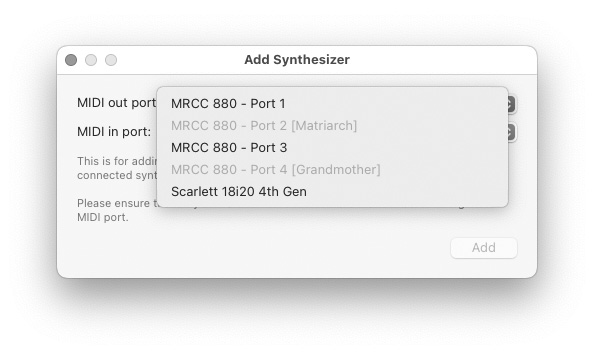 IMPORTANT: Due to how the current firmware works on the Grandmother/Matriarch, you must ensure that only one synth is connected to a given port pair. This is especially important if you use a MIDI router or merge/thru boxes.
The app helps in this by graying out MIDI ports already added to its database — as you can see on the screen shot above.
You should also ensure that the same synth model is always connected back to the same port pair. The app will warn you if a mismatch is detected.
Reconnecting
Should the connection to the synth become quirky, you can reconnect using the circular arrow icon in the top right corner (or by choosing Synthesizer > Reconnect from the menu, or by pressing Cmd+R). This will reload all settings from the synth.
The connection to the Grandmother/Matriarch is bi-directional, but the synths send change CCs only for a handful of global settings: Swing, Keyboard Octave, Glide Type, Gated Glide, Legato Glide, Square LFO Polarity and Noise Filter Cutoff. If you change any other global setting on the synth, use Reconnect to read the new value.
|
Want to learn more?
A picture is worth a thousand words: check out the screen shots for a detailed overview of the app.
|
 Buy Mother Global Settings from the App Store for
€59.99 / $59.99 
The price for your country is automatically calculated by the App Store.
Includes both Mac and iPad versions. Discount available for educational institutions. |


